 Skye
Weighbridgeto slipto books
For stone crushers and quarries. Runs on your own computer, even without internet.
Try Business free for 7 days. Windows 10 and 11.
The owner's phone app comes with Business.
Gate
The app
See today's loads, sales, cash and credit as soon as you open Skye.
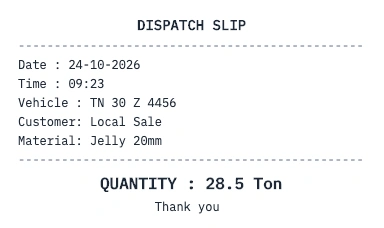
Read the weight from your weighbridge and print the slip with F12.
Every slip, payment and expense of the day in one list.
See how much each customer owes and since when.
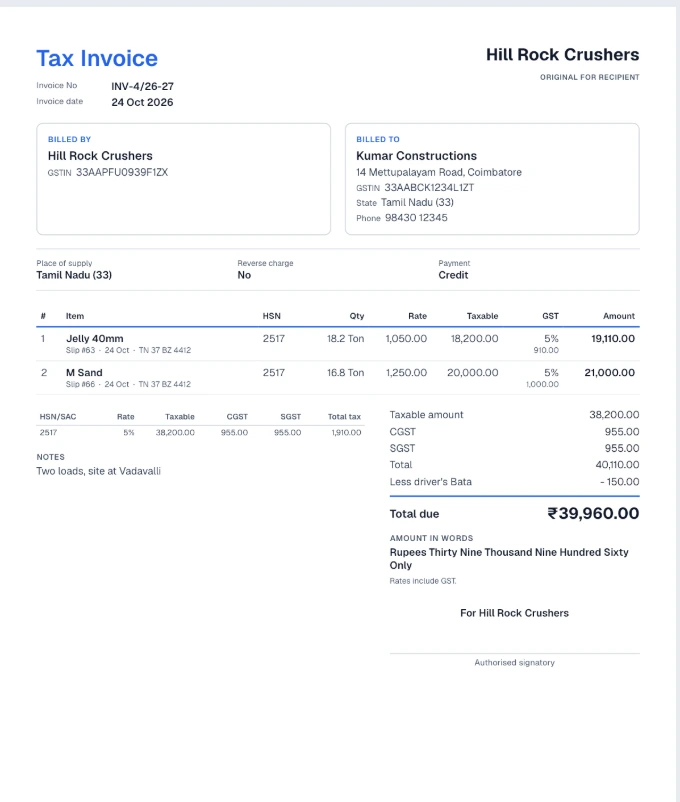
Make GST invoices from the slips you have already weighed.
Sales by day, month, customer or material, in Excel and PDF.
With the Business plan, the owner sees the books on an Android phone.
Slips and invoices
Dispatch slips and GST invoices
When you press F12, Skye prints a dispatch slip on your 80 mm printer and saves the load in the day book. At month end you make GST invoices from those slips in one press.
- Payment reminders on WhatsApp
- Customer statements as PDF
- Tally and GSTR-1 export for your accountant
Your data stays on your computer
Skye keeps your books on your own computer, so the gate and billing keep working without internet. If the computer breaks, you restore your books from the backup on your second drive.
More about backups- Works without internetWeighing, slips and books all work offline.
- Automatic backupsAfter every truck, with a copy on a second drive.
- Nothing deleted by SkyeIf your plan ends, your books stay on your computer and you can export them.
Pricing
Try Business free for 7 days. Prices are before GST.
Basic
Up to 2 users
₹2,490
a month, or ₹24,900 a year
Business
Up to 7 users, with the cloud copy and the phone app
₹3,990
a month, or ₹39,900 a year
Pay on WhatsApp and we send you a plan code to enter in Skye. See full pricing
How to get started
- Send us your details on WhatsAppYour name, your business and your town.
- We set up Skye with youWe help you install it on your computer and set up your business.
- Use it free for 7 daysThen choose a plan. No card needed.
Questions
Does Skye need internet?
No. Weighing, slips and the books all work without internet. Skye checks your plan when it is online and keeps working for 30 days without a check, with 7 more days of grace.
Will it work with my weighbridge?
Skye reads the weight your indicator sends over a serial or USB cable and finds the weighbridge by itself. If you are not sure about yours, send us the make and model of the indicator on WhatsApp.
Which printer do I need for slips?
Any 80 mm thermal slip printer. Invoices can be printed, saved as PDF or sent on WhatsApp.
Which computers does Skye run on?
Windows 10 and Windows 11, 64 bit.
What if my computer breaks?
Skye backs up your books after every truck and copies them to a second drive. On a new computer you restore them from Settings.
What happens if my plan ends?
Your books stay safe on your computer. You can still export every book as PDF and Excel and back them up. New slips wait until a plan is active again.
How do I pay?
Pay on WhatsApp and we send you a plan code. You type the code into Skye and the plan starts. Monthly, quarterly or yearly.
Get early access to Skye
Early access is open for stone crushers and quarries. Send your details on WhatsApp and we will set Skye up with you.
It comes straight to us, and we reply as soon as we can. Or email contact@aislinnco.com